
Armor enchanting and trading
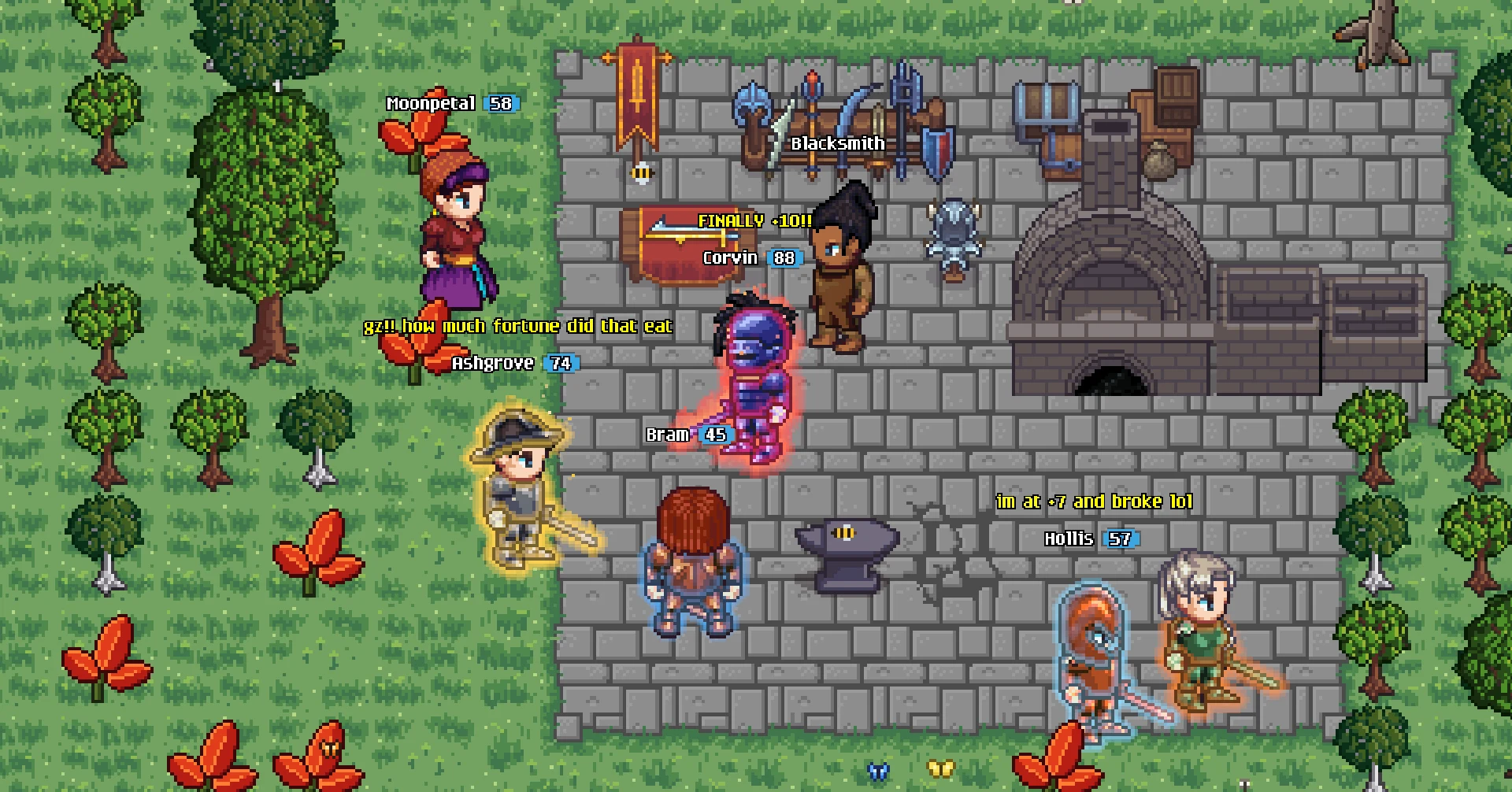
Enchant your armor and swords up to a glowing +10, trade and lend gear with other players, meet a new chat and Nearby Players, and download much smaller updates.
Armor enchanting
Melee armor and swords can now be enchanted, all the way up to +10. Choose Enchant on any anvil, pick a piece of gear, and spend Fragments and gold on a chance to raise it a level. Each level adds to the gear's bonuses, up to 30% more at +10, about a whole tier's worth.
The first levels are safe and quick, but the odds fall fast. The window always shows your exact chance and cost before you try.
| Level | Chance, before Fortune | Gear bonus | If it fails |
|---|---|---|---|
| +1 | Always | +2% | Can't fail |
| +2 to +5 | 85% down to 40% | +4% to +10% | Keeps its level |
| +6 | 25% | +13% | Keeps its level |
| +7 | 15% | +16% | Keeps its level |
| +8 | 8% | +20% | Keeps its level |
| +9 | 5% | +25% | Drops a level |
| +10 | 2% | +30% | Drops a level |
Fortune
Every failure builds Fortune, and the harder the level, the more you get. Channel it into a later attempt and each point adds a tenth of that attempt's chance: 20 Fortune turns a 2% shot into 6%. No attempt goes above 90%. A success while channelling spends it all, so you can turn channelling off to save it up for a big attempt. Each metal has its own cap on the Fortune its failures build.
Fragments and Salvage
Fragments come from the anvil's new Salvage tab, which breaks melee armor and swords into Fragments of their metal, one for each bar the piece takes to smith. Spare gear of every metal is now worth keeping.
The glow
From +6, enchanted gear glows in the world, and every level looks different:
| Level | Look |
|---|---|
| +6 | A soft blue glow |
| +7 | A brighter, pulsing blue |
| +8 | An orange glow with low flames and drifting motes of light |
| +9 | A pulsing gold glow with sparks leaping off the armor |
| +10 | Crimson fire licking up off every edge, with embers rising |
Every piece of armor and your sword glow at their own level, so each piece shows off as soon as you enchant it. A full set of five pieces, all at +6 or higher, glows as one suit, lights your shield too, and sends up its lowest piece's motes, sparks or embers. The glow surrounds the gear, so it stays easy to see on any metal, even blue on Mithril or crimson on Emberite.
Enchanted gear shows its level on its icon and in its name, and keeps it in your bank and on the ground. It can be sold in player shops, where each level is its own listing, but regular shops don't buy it. Reaching +9 is announced to the world, and +10 to everyone on Discord. No part of enchanting can be bought with Gems or Taria Tokens.
Trading and lending
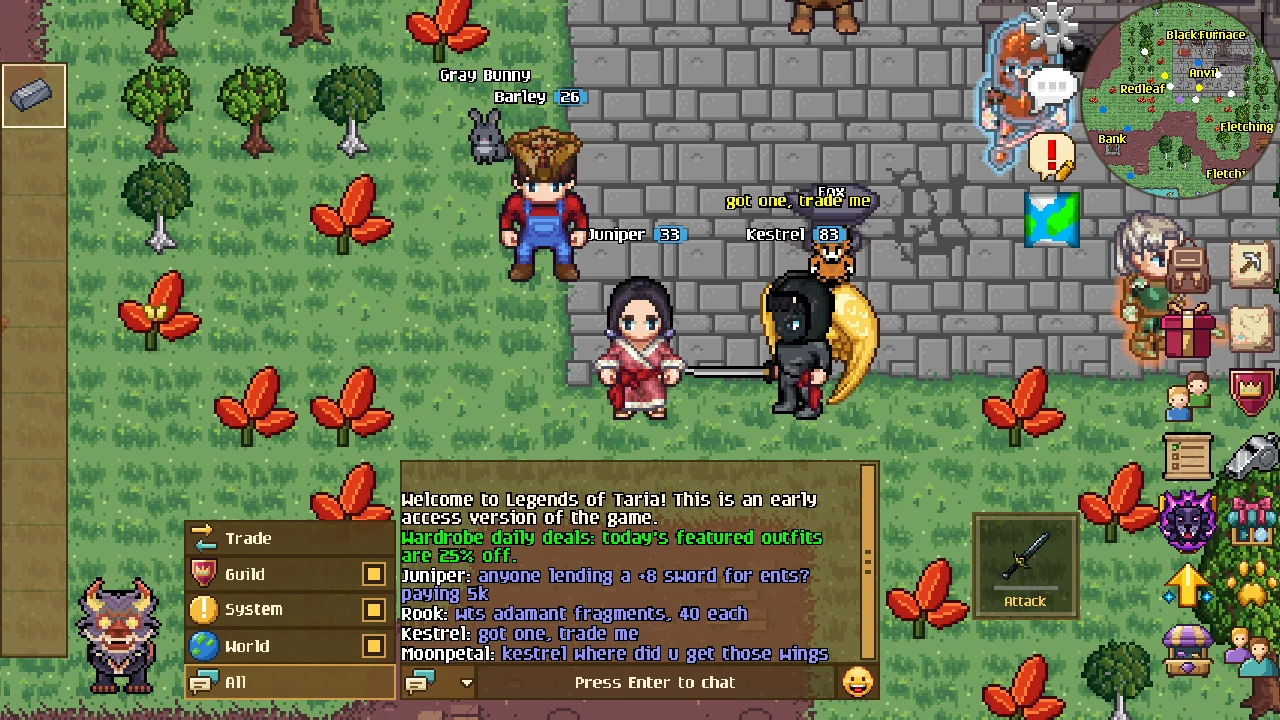
You can now trade with other players. Pick someone in Nearby Players and choose Trade. Your request shows up in their chat: the chat bubble turns into a Trade icon, and opening chat takes them to the new Trade channel, which lists everyone asking with their face and Accept and Decline buttons. If they decline, you're told.
Once they accept, you both get the trade window. Offer backpack items (tap them with 1, 5, 10, All or your own amount) and gold, and accept when both offers look right. Any change clears both accepts and tells the other player, and before the trade goes through you both get a final check that lists every item by name. Untradeable items can't be offered, and walking away, closing the window or logging out cancels the trade with nothing lost.
Lending. You can also lend gear, weapons and tools for 1 to 72 hours, with no need to trust anyone. The game holds your item and brings it back to your bank when the time is up, even if either of you is offline.
- The borrower gets a borrowed copy, marked in red. They can wear it, take it off and bank it, but can't drop, sell, trade or enchant it, and can select it and tap Return to give it back early.
- You can lend one item and borrow one item at a time.
- Gold paid in a trade with a loan is a lending fee, and the game keeps 10% of it for guaranteeing the loan.
- Enchanted gear keeps its level when traded or lent.
Nearby Players
A new Nearby Players button by the minimap lists everyone around you, with their face beside their name: your friends and guildmates first, then everyone else by name. Pick someone to see them in full and choose what to do:
- trade with them
- add them as a friend, or accept their request
- message a friend, which opens chat on your conversation with them
- invite them to your guild
- ignore or unignore them
- report them, with their name already filled in
It works the same in a crowd as with one other player around, with no need to tap the right person.
A new chat
Chat shows more of the conversation. When you aren't using it, chat is plain outlined text over the world that runs down to the bottom of the screen, with no box, tabs or input bar, and lines sit closer together so more fits. A small chat bubble in its corner shows where chat is even when it's empty.
Tapping the bubble or any chat line opens the full chat box, now a little taller, and tapping its bottom line or pressing Enter starts typing straight away. The box stays open, even after you send a message, until you tap or click anywhere outside it.
- Channels in one menu. The channel tabs moved into a drop-down button beside the input. It lists All, World, System, Guild and each private chat by your friend's full name, and stays open while you switch channels.
- All, World and System. All shows everything, World only what players say, and System only the game's own messages. Typing in any of them talks in World.
- Choose what All shows. While All is showing, every other channel in the menu has a box you can untick to keep it out of All. World, Guild and System remember your choice.
- New icons. Each channel has an icon that matches it: speech bubbles for All, a globe for World, a gold notice for System, a crowned shield for Guild and a sealed letter for private chats. The Friends and Guild buttons by the minimap have new icons too.
Smoother and smaller
- No more resyncing. Alt-tabbing, switching browser tabs or switching apps no longer resyncs the game when you come back. Nearby players and monsters no longer vanish and reappear, open windows stay open, the music keeps playing, and the "Syncing latest world state" banner is gone. The game simply catches up with what happened while you were away.
- Steadier connections. If your connection drops, "Connection lost" appears only when getting back in takes longer than a few seconds. On your phone, the world keeps your character for up to 10 minutes while the app is in the background, as it already did for a browser tab. Moving from Wi-Fi to mobile data no longer drops you, and where the game has to reconnect it does so within a couple of seconds. Chat, private and guild messages, friend requests and guild invites that a dropped connection took with it are waiting for you under "While you were away:" when you come back.
- A faster connection. The game now plays over a faster connection where your network allows it, in the apps and in Chrome, Edge, Firefox and Safari 26.4 or newer. Your own walking and other players and monsters no longer hitch when your connection drops a packet, and other players, on foot or mounted, stop walking the moment they stop instead of taking an extra step on the spot. The switch happens right after you log in, without a pause, and where your network blocks it the game plays over its usual connection. The performance overlay's ping line now starts with the connection you're on: QUIC for the faster one, WebSocket for the usual one.
- Much smaller updates. The game's files are now split into hundreds of small pieces, and an update only fetches the pieces that changed: a tweaked sound downloads just that sound, and a new outfit just its own art. The download before the main menu shrinks from about 40 MB to about 9 MB for most players. Music and ambient sounds download the first time they play, so they can start a moment late that first time. The Chinese, Japanese and Korean font downloads only when you pick one of those languages, and each language downloads when you pick it.
- Your screen stays on. Your screen no longer dims and turns off while the game is open, on Android, iPhone and iPad and in the browser, so chopping, fishing or fighting without touching the screen keeps going. It sleeps as usual once you switch away from the game.
Also new
- New pet: the Spectral Twin Dragon, a see-through, moonlit ghost of the Twin Dragon with both its heads, for 1,800 Taria Tokens or Gems. It joins the Halloween pets at the front of the pet shop while Veilfall runs and stays in the shop afterwards.
- The on-screen movement pad is gone on desktop and in browsers without a touch screen, where you walk with WASD or by clicking. Phones, tablets and touch-screen laptops still have it.
- After finishing First Steps, the game asks once how you found Legends of Taria, with one tap to answer. You can skip it, and you're never asked again on that account.
- On iPhone, iPad and Android, the game may now and then ask you to rate it, using the App Store's or Google Play's own window, right after a highlight such as finishing a quest, reaching a milestone skill level or your first kill of a boss. It never asks during the tutorial or right after a death or a purchase, waits until you're out of combat with menus closed, and asks at most three times in all, at least four months apart.
Privacy
- The Android app no longer reads your phone's advertising ID.
- A new page at legendsoftaria.com/delete-account explains how to delete your account in the game or by email, the 30-day grace period, and what is deleted and what is kept.
- The Privacy Policy now lists everything the game collects and why.
Fixes
- Townsfolk and quest characters, such as the instructors, shopkeepers, Captain Hale and the Veilfall cast, no longer bob up and down while they stand still.
- Tapping a bank chest, a door, a tree or an item on the ground just as you walk up to it no longer does nothing when your connection hiccups. The world now waits for your last steps to arrive, then opens the bank or picks the item up.
- Playing in Chrome on an Android phone, tapping the bank's amount box, or any text box away from the bottom of the screen, brings up the keyboard again.
- With Side Padding set (Settings > Graphics), or on phones with a notch, the main menu's dark tint and the dimmed background behind its popups now reach the edges of the screen instead of leaving bright strips down both sides. The fade to black in cutscenes covers the whole screen too.